Skip to content
Yujia Zhao

Agentic onboarding for enterprise data analytics platform

Defined the end-to-end agentic onboarding vision and framework for Alteryx One — a multi-module enterprise data platform, translating user intent into system artifacts, leading users to value, while establishing crucial mental models.

This case study is password protected

My role
Team lead
Time
Q2, 2026
Worked with
2 designers, 1 researcher, 2 PMs, 1 tech lead

Onboarding challenge at a glance

Smooth out the journey of achieving jobs to be done (JTBD) while building the right mental model.

New users have JTBD, and Alteryx One has a set of solutions to match. The onboarding challenge of the Alteryx One platform, at its core, is about helping users connect the data tasks in their minds to the different actions to perform and artifacts to create in a large, value-rich platform. Meanwhile, it should help users understand how Alteryx One works on a system level.
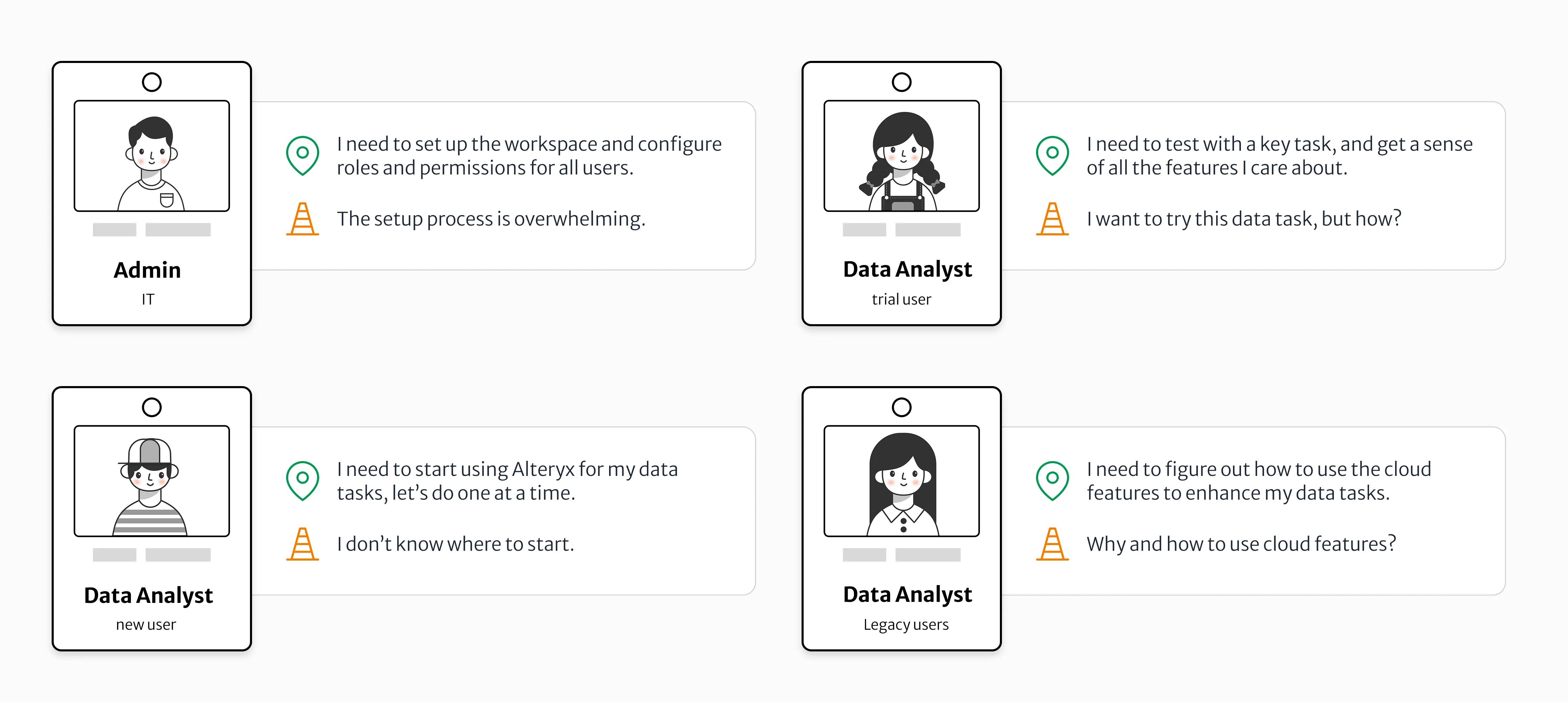
Four user ID cards, each with a need and a friction. Admin (IT): "I need to set up the workspace and configure roles and permissions for all users," but "The setup process is overwhelming." Data Analyst, trial user: "I need to test with a key task, and get a sense of all the features I care about," but "I want to try this data task, but how?" Data Analyst, new user: "I need to start using Alteryx for my data tasks, let's do one at a time," but "I don't know where to start." Data Analyst, legacy user: "I need to figure out how to use the cloud features to enhance my data tasks," but "Why and how to use cloud features?"
User types and their main JTBDs
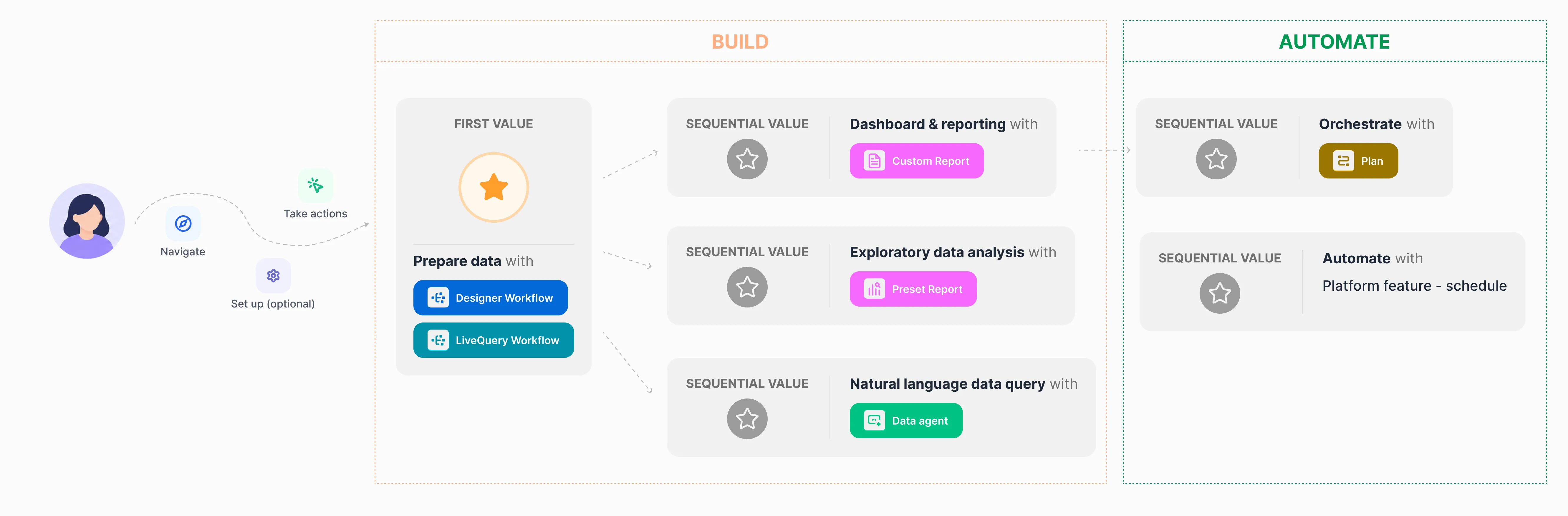
A data analyst's journey to value. From the user, a path through Navigate, Take actions and an optional Set up step leads into a Build stage. First value is preparing data with a Designer Workflow or a LiveQuery Workflow. That branches into three sequential values: dashboard and reporting with a Custom Report, exploratory data analysis with a Preset Report, and natural language data query with a Data agent. An Automate stage follows, with sequential values for orchestrating with a Plan and automating with the platform schedule feature.
Data Analyst's onboarding journey to value

Unique opportunity with AI agent

From user learning to agent leading

While pre-AI onboarding was about users figuring out where to go, what actions to take, what to set up, and what to build in order to finish the JTBD, an AI agent can transform the entire onboarding experience by giving answers directly and building and taking actions on users’ behalf, all while teaching the under-the-hood system model.
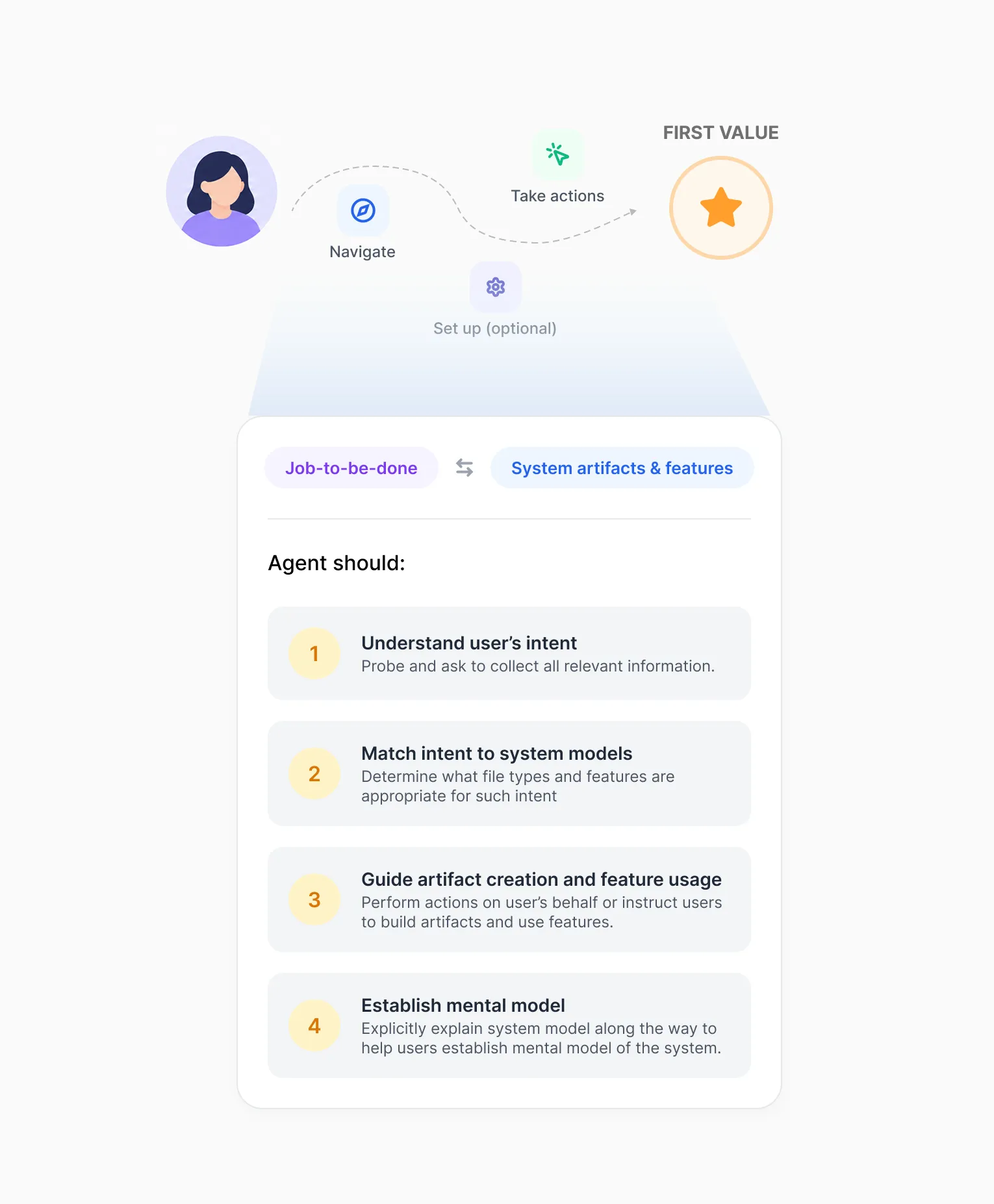
A user travels a dashed path through Navigate, Take actions and an optional Set up step to First value. Zoomed in beneath the path, a card links Job-to-be-done with System artifacts & features and lists what the agent should do: 1, understand user's intent — probe and ask to collect all relevant information; 2, match intent to system models — determine what file types and features are appropriate for such intent; 3, guide artifact creation and feature usage — perform actions on user's behalf or instruct users to build artifacts and use features; 4, establish mental model — explicitly explain the system model along the way.

Design challenge

How to specify agent's behavior so that new users would experience minimum friction accomplishing their first JTBD while getting a good grasp of how Alteryx One works?

Solution layer 1 – The framework

Compared to pre-AI design solutions, a foundational piece of the design solution for AI agent is a set of ever-improving guides of how it should behave.

How users should be onboarded and how we want to onboard them are translated into a framework for the AI agent to follow. This is only the starting point — as product features and our onboarding philosophy evolve, this framework should evolve accordingly.
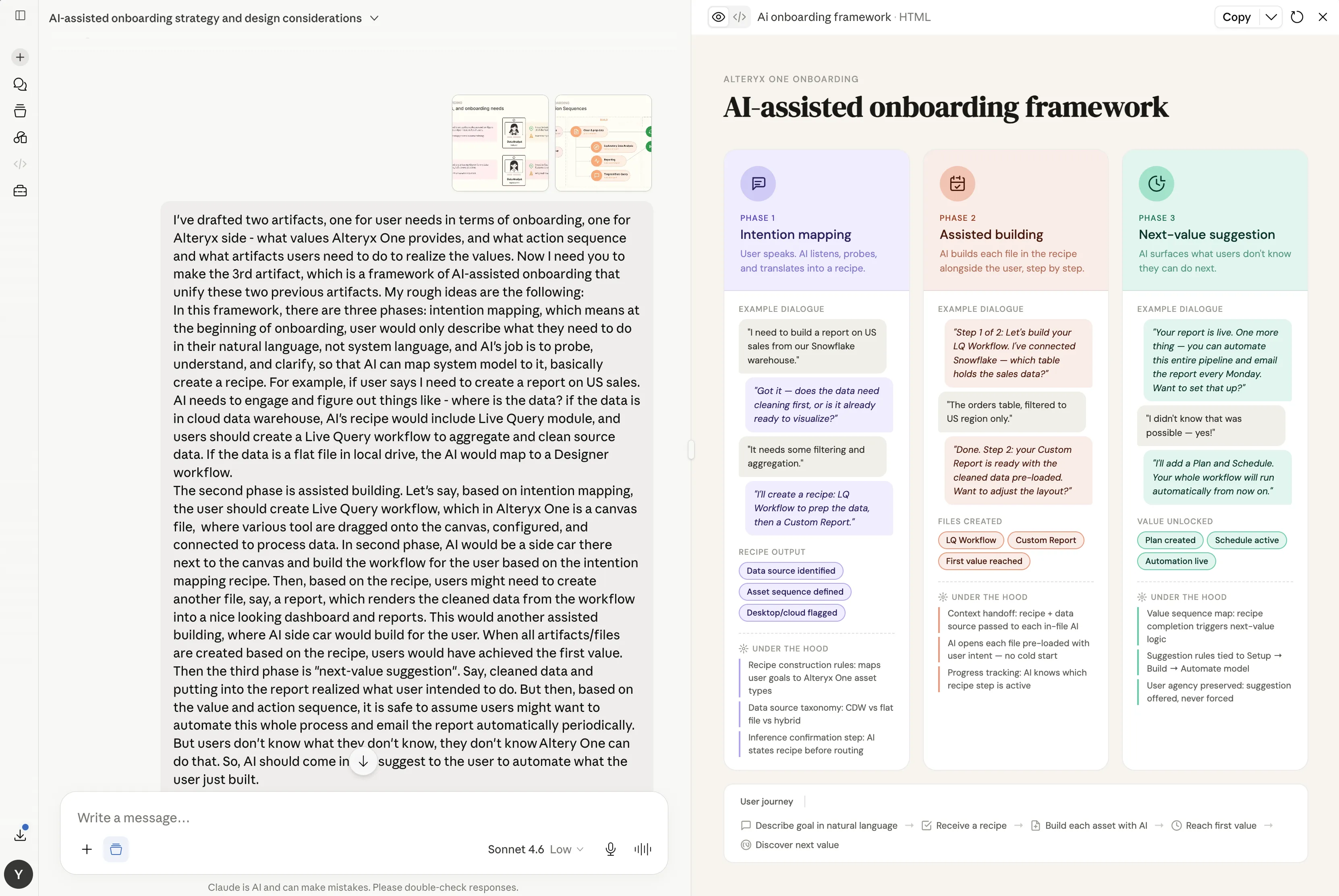
Drafting the AI-assisted onboarding framework in a conversation with Claude. On the left, the brief describes three phases and attaches the user-needs and journey diagrams. On the right, the resulting framework has three columns, each with example dialogue and what happens under the hood. Phase 1, intention mapping: the user speaks and the AI listens, probes and translates the goal into a recipe. Phase 2, assisted building: the AI builds each file in the recipe alongside the user, step by step. Phase 3, next-value suggestion: the AI surfaces what users don't know they can do next, such as scheduling the report. A user journey runs along the bottom: describe goal in natural language, receive a recipe, build each asset with AI, reach first value, discover next value.

Solution layer 2 – Vision prototype

Giving a concrete example of how the AI agent should behave during onboarding.

I built the prototype around the most common use case — cleaning and prepping data, then using the cleaned, aggregated data for reporting — to show how the journey to first value could ideally unfold.

Solution layer 3 – Detailed guidance

The framework sets the scaffolding, the prototype lays out one path, and detailed guidance fills in the rule book over time.

There are so many situations and edge cases, and they keep changing as AI models improve and agents grow more capable. It is crucial to start with a few key principles, then keep adding, removing, and updating them.
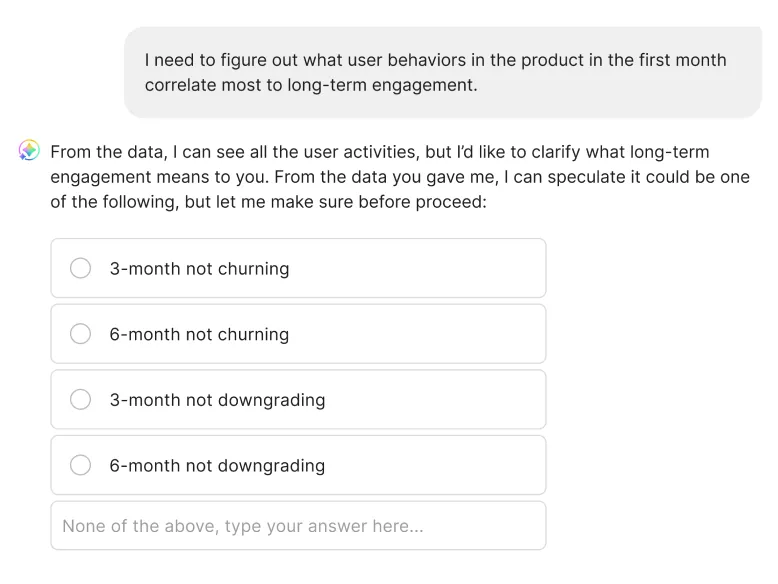
  • An agent conversation. The user writes: "I need to figure out what user behaviors in the product in the first month correlate most to long-term engagement." The agent replies that it can see all the user activities but would like to clarify what long-term engagement means, and offers options: 3-month not churning, 6-month not churning, 3-month not downgrading, 6-month not downgrading, or none of the above with a field to type an answer.

    1 — Don’t guess & don’t rush

    Ask and present options when there isn’t enough context yet to make a confident recommendation.

    User trust is thin during onboarding, so it is better to go slow but steady.
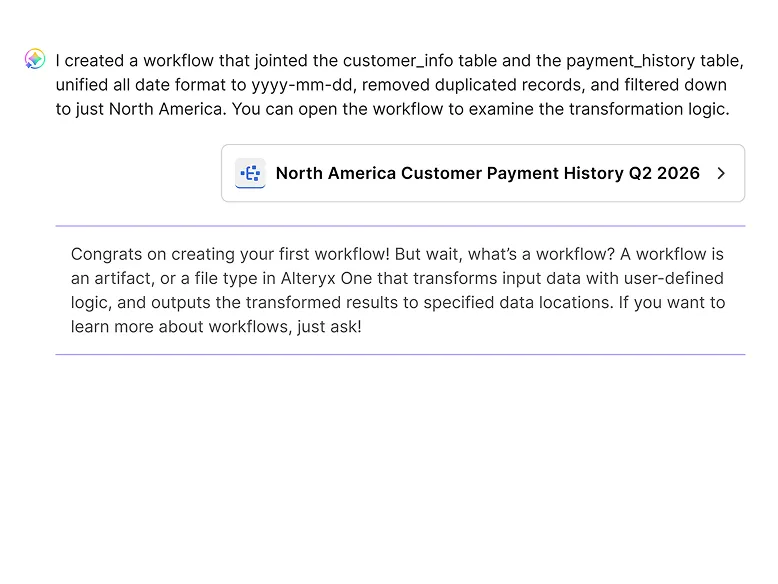
  • An agent message: "I created a workflow that jointed the customer_info table and the payment_history table, unified all date format to yyyy-mm-dd, removed duplicated records, and filtered down to just North America." A link card opens the workflow "North America Customer Payment History Q2 2026." Below, set off by purple rules: "Congrats on creating your first workflow! But wait, what's a workflow?" followed by a short explanation and an invitation to ask for more.

    2 — Teach in context

    Help users establish Alteryx One literacy piece by piece, in natural context.

    Keep a record of each user’s literacy level in the backend, and teach the next piece of knowledge when appropriate.
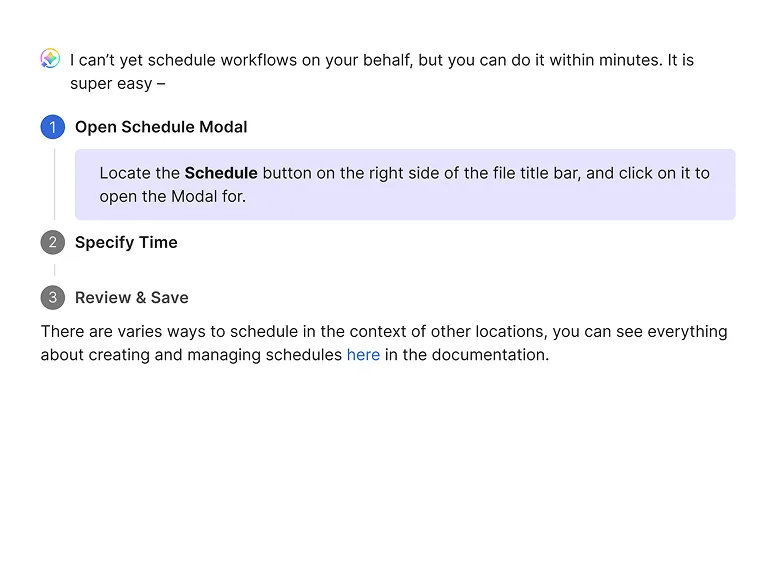
  • An agent message: "I can't yet schedule workflows on your behalf, but you can do it within minutes. It is super easy." Three numbered steps follow — Open Schedule Modal, Specify Time, Review & Save — with the first expanded: "Locate the Schedule button on the right side of the file title bar, and click on it to open the Modal for." A closing line links to the documentation on creating and managing schedules.

    3 — Tell, when can’t do

    Give step-by-step instructions for actions agents can’t yet perform on users’ behalf.

    The documentation is already in the agent’s training; this is the translation and presentation layer.